Sandbox Service
Secure code execution for AI agents. Run TypeScript and Python in isolated containers with configurable resource controls, network policies, and full audit logging.
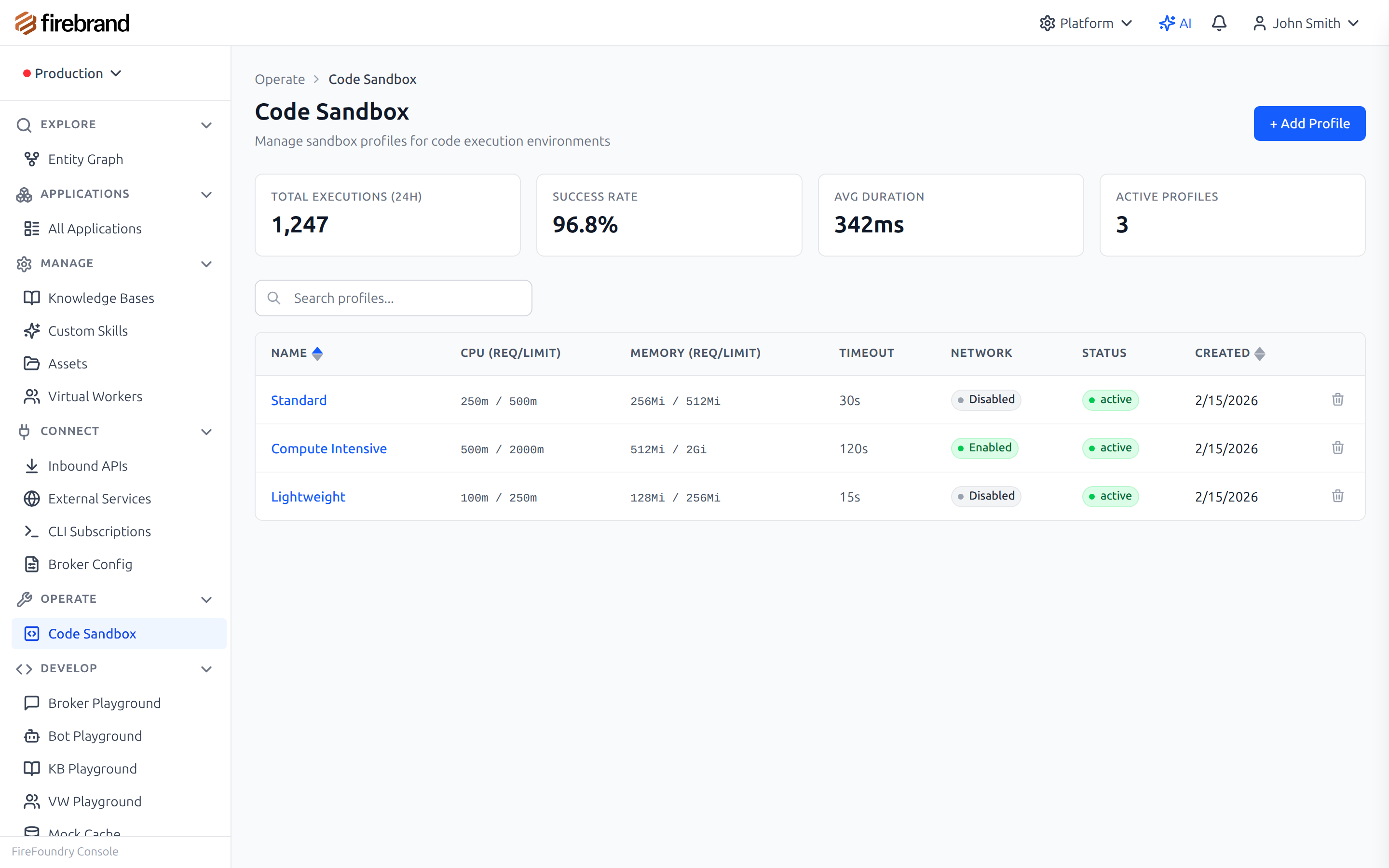
Configure sandbox profiles with resource limits and security policies
Why It Matters
AI agents generate and execute code. Data analysis scripts, file transformations, API integrations. Without isolation, one mistake — or one malicious prompt — can compromise your infrastructure. Building sandbox environments from scratch means managing container lifecycles, implementing resource limits, configuring network policies, and wiring up audit logging.
The Sandbox Service provides pre-configured execution environments where code runs safely, with every execution logged for audit. Define profiles with specific language runtimes, resource limits, and network access rules. Your agents execute code by referencing a profile name — the service handles container provisioning, isolation, execution, cleanup, and audit recording automatically.
Key Capabilities
- Multi-Language Support: TypeScript and Python execution in purpose-built environments with pre-installed libraries
- Container Isolation: Each execution runs in its own container — no access to host resources, no shared filesystem
- Configurable Profiles: Define CPU, memory, timeout, network access, and filesystem permissions per use case
- Network Policies: Control which external services sandboxed code can reach — whitelist specific endpoints or block all network access
- Resource Limits: Hard CPU and memory caps prevent runaway processes from affecting the platform
- Execution Timeout: Configurable timeouts with graceful termination and cleanup — no zombie processes
- Full Audit Logging: Every execution is recorded — input code, output, resource usage, timing, and exit status
- MCP Integration: Available as a tool through the MCP Gateway — agents execute code seamlessly via the standard MCP protocol
Sandbox Execution Architecture
How code flows from agent request to isolated execution and back
How it works: When an agent submits code for execution, the Sandbox Service resolves the execution profile (language, harness, resource limits, network policy), provisions an isolated container from the pool, executes the code with enforced constraints, captures stdout, stderr, and return data, then records the full execution in the audit log. The container is cleaned up after execution completes or times out.
Execution Profiles
Profiles are pre-configured execution environments that define the language runtime, available libraries, resource limits, network access, and timeout. Select a profile by name when executing code — the service handles everything else.
python-analysis
Python with pandas, numpy, and matplotlib pre-installed. Designed for data analysis, statistical computation, and visualization generation.
typescript-general
TypeScript/Node.js runtime for general-purpose code execution. Supports npm packages and modern ES module syntax.
Custom Profiles
Define your own profiles with per-field configuration. Choose the language, resource limits, network policy, and timeout that match your specific use case.
Running Code in the Sandbox
Agents generate analysis code and execute it in an isolated environment. The sandbox handles container provisioning, file injection, execution, and result collection automatically.
import { Bot, sandbox } from '@firefoundry/agent-sdk';

@Bot({ name: 'data-analyst' })
class DataAnalyst {
  async analyzeData(dataset: string, question: string) {
    // Generate analysis code
    const code = await this.generateAnalysisCode(dataset, question);

    // Execute in isolated sandbox
    const result = await sandbox.execute({
      profile: 'python-analysis',
      language: 'python',
      code: code,
      timeout: 60000,
      files: {
        'data.csv': await this.fetchDataset(dataset)
      }
    });

    return {
      output: result.stdout,
      charts: result.files['output.png'], // Generated visualizations
      exitCode: result.exitCode,
      executionTime: result.durationMs
    };
  }
}
Security Model
The Sandbox Service implements defense in depth. Every layer operates independently so that no single failure compromises the system.
- Container Isolation: Each execution runs in its own container with no shared filesystem and no host access. Containers are destroyed after execution.
- Resource Quotas: CPU and memory limits enforced by the container runtime. Runaway processes are terminated before affecting other workloads.
- Network Policies: Per-profile network rules — block all access or whitelist specific endpoints.
- Execution Timeout: Configurable timeouts with graceful termination and cleanup. Timeout events are recorded in the audit log.
- Audit Logging: Every execution recorded with input code, stdout, stderr, return data, errors, resource usage, and timing.
MCP Integration
The Sandbox Service is available as an MCP tool through the MCP Gateway. External agents and
integrations can execute code using the standard MCP protocol without the SDK. The
sandbox_execute_code tool
accepts code, language, and harness as inputs.
| Tool Name | Description |
|---|---|
| sandbox_execute_code | Execute code in a secure sandbox environment. Supports TypeScript and Python with configurable harness selection. |
Parameters:
code (string, required) — the code to execute.
language (enum, required) — typescript or python.
harness (enum, required) — execution harness to use.
Returns success status, stdout, stderr, return data, and errors.
Use Cases
Data Analysis
Let agents run Python scripts for statistical analysis, visualization, and data transformation. Pre-installed libraries like pandas, numpy, and matplotlib handle common analysis tasks. Generated charts and files are captured and returned alongside text output.
Code Validation
Test generated code in isolation before applying to production systems. Run unit tests, validate transformations, and verify output format — all in a sandboxed environment where failures cannot affect the rest of the platform.
API Integration
Execute code that calls external APIs in a controlled environment. Whitelist specific endpoints per profile so agents can fetch data from approved services while blocking all other network access. Response data is captured and returned alongside execution output.
File Processing
Transform, convert, and analyze files in sandboxed environments. Inject input files into the sandbox, run processing code, and collect output files — all with full isolation and audit logging. CSV parsing, JSON transformation, and format conversion run safely.